

By Neil Squillante | Wednesday, July 1, 2009
Today's issue of TechnoLawyer NewsWire covers a new automated legal forms program for New York lawyers (see article below), an iPhone app for scanning documents on the go, a legal-specific toolbar for Microsoft Office that automates document creation, a site on which you can search for large firm client memos, and a personal knowledge management application. Don't miss the next issue.
Cut Document Drafting Time in Half
Do you draft legal documents? Would you like to reduce the time it takes to draft these documents? Here's a tip — delegate the work to someone else. Of course, someone has to do the work and that someone might be you so delegation may not work. Fortunately, an alternative solution exists — use document assembly software that contains all the forms you regularly use.
ProDoc New York Automated Forms … in One Sentence
West's ProDoc New York Automated Forms is a document assembly system that ships with a library of forms, eliminating the need to create your own.
The Killer Feature
Launching today, ProDoc New York Automated Forms joins its California, Florida, and Texas siblings in the West Forms family. West claims that these products can cut drafting time in half and also reduce errors.
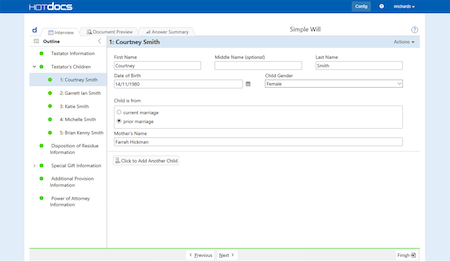
ProDoc New York Automated Forms accomplishes this feat thanks to a patented document-assembly engine that enables you to create several documents simultaneously. You choose the documents you want to assemble, and then answer the corresponding questions. ProDoc New York Automated Forms then builds your documents in your word processor for final review and editing. The California, Florida, and Texas versions work the same way.
Other Notable Features
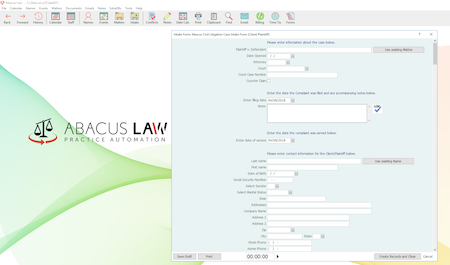
ProDoc New York Automated Forms has other time-saving features as well. For example, it saves all of the client and case data you enter for reuse in other documents you create, thus eliminating dual entry.
You can tailor ProDoc New York Automated Forms to your practice by choosing from the following libraries: Family Law, Estate Planning, Real Estate, or Office Practice (the latter includes all libraries).
ProDoc New York Automated Forms also includes forms for New York Office of Court Administration (OCA) and Surrogate's Court. You'll also find model forms created by lawyers who are experts in their respective fields. ProDoc New York Automated Forms automatically keeps these forms up to date over the Internet.
What Else Should You Know?
ProDoc New York Automated Forms includes three licenses. Each additional license costs $10. You can use ProDoc New York Automated Forms in conjunction with ProDoc Small Office Suite for an additional $25. ProDoc Small Office Suite is a practice management system that features a calendar, time and billing, client and case organization, contact management, document management, and client and case notes. Learn more about ProDoc New York Automated Forms.
How to Receive TechnoLawyer NewsWire
So many products, so little time. In each issue of TechnoLawyer NewsWire, you'll learn about five new products for the legal profession. Pressed for time? The "In One Sentence" section describes each product in one sentence, and the "Killer Feature" section describes each product's most compelling feature. The TechnoLawyer NewsWire newsletter is free so don't miss the next issue. Please subscribe now.
By Sara Skiff | Tuesday, June 16, 2009
Coming today to TechnoFeature: Need to create your own forms? Microsoft Word expert Carol Bratt has written a clear and concise Microsoft Word tutorial that will have you creating fill-in forms in no time flat. This tutorial unravels the mystery behind merging cells, and creating drop-down boxes, text boxes, check box field forms, spacing, borders, and even form security. This particular tutorial explains how to create a round trip form that your clients receive via email and return to you complete with data.
How to Receive TechnoFeature
Our flagship newsletter never disappoints thanks to its in-depth reporting by leading legal technology and practice management experts, many of whom have become "household names" in the legal profession. It's in TechnoFeature that you'll find our oft-quoted formal product reviews and accompanying TechnoScore ratings. The TechnoFeature newsletter is free so don't miss the next issue. Please subscribe now.
By Sara Skiff | Friday, May 22, 2009
Coming today to Fat Friday: Senior Marketing Manager Conrad Saam responds to our criticism of Avvo's Top Legal Blogs list, Edward Zohn defends his position on whether lawyers should know how to build a PC, Ron Murphy describes his Mac-based backup routine, Thomas Sennett shares a tip about using Dragon NaturallySpeaking on a computer with iTunes installed, and Michael Gibney discusses his problem with the marketing of iCreate. Don't miss this issue.
How to Receive Fat Friday
Our most serendipitous offering, Fat Friday consists of unsolicited contributions by TechnoLawyer members. You'll no doubt enjoy it because of its mix of interesting topics and genuinely useful knowledge, including brutally honest product reviews and informative how-tos. The Fat Friday newsletter is free so don't miss the next issue. Please subscribe now.
By Sara Skiff | Friday, May 15, 2009
Coming today to Fat Friday: Bob Walsh explains the importance of filing email by case plus he reviews FileCenter and MozyPro, Elaine Dowling describes her backup routine and how it has improved her practice, former large firm lawyer Robert Brouillette offers advice to other "large firm refugees" going out on their own, Edward Zohn reviews Western Digital enterprise-grade hard drives, and Tom Trottier shares his take on the world's first laptop. Don't miss this issue.
How to Receive Fat Friday
Our most serendipitous offering, Fat Friday consists of unsolicited contributions by TechnoLawyer members. You'll no doubt enjoy it because of its mix of interesting topics and genuinely useful knowledge, including brutally honest product reviews and informative how-tos. The Fat Friday newsletter is free so don't miss the next issue. Please subscribe now.
By Sara Skiff | Thursday, May 14, 2009
Coming today to Answers to Questions: Erin Baldwin reviews Stamps.com, Richard Keyt calls for an end to the Word/WordPerfect debate and suggests more productive topics of discussion, Paul Purdue explains discusses Tabs3 for time-billing, Stephen Seldin reviews CrossEyes for revealing formatting code in Word, and Perry Bulwer reviews the Samsung SyncMaster 226BW 22' monitor and WinTV. Don't miss this issue.
How to Receive Answers to Questions
Do you believe in the wisdom of crowds? In Answers to Questions, TechnoLawyer members answer legal technology and practice management questions submitted by their peers. This newsletter's popularity stems from the relevance of the questions and answers to virtually everyone in the legal profession. The Answers to Questions newsletter is free so don't miss the next issue. Please subscribe now.
By Sara Skiff | Thursday, May 7, 2009
Coming today to Answers to Questions: Roger Neils reviews the Philips Digital Pocket Memo 9500 with SpeechExec Pro Dictate, Paul Purdue reviews Carbonite for online backup, Frank Lanigan reviews PDF Converter Pro and Nuance's customer support, Elizabeth Travis explains how to create a macro in Word 2003, and Michael Schwartz offers a money-saving Time Matters tip. Don't miss this issue.
How to Receive Answers to Questions
Do you believe in the wisdom of crowds? In Answers to Questions, TechnoLawyer members answer legal technology and practice management questions submitted by their peers. This newsletter's popularity stems from the relevance of the questions and answers to virtually everyone in the legal profession. The Answers to Questions newsletter is free so don't miss the next issue. Please subscribe now.
By Neil Squillante | Wednesday, April 22, 2009
Today's issue of TechnoLawyer NewsWire covers an email discovery utility (see article below), document comparison software, two mobile dictation apps, and a mobile expense- and time-tracking app. Don't miss the next issue.
Take a Load Off Your Email Discovery Chores
When you receive a box of documents from opposing counsel, you know what to do with it. Convert the paper into searchable PDF files, and load them into your litigation support software. But with all the juiciest evidence in email messages nowadays, what happens when opposing counsel sends you a PDF Portfolio containing one or more email accounts, each with hundreds or thousands of email messages?
AutoPortfolio … in One Sentence
EverMap's AutoPortfolio is an Adobe Acrobat plug-in that extracts email data from PDF Portfolios to create "load files" for use in litigation support software.
The Killer Feature
A PDF Portfolio (or Package) is a special PDF file comprised of many individual files. Because Acrobat adds a "Convert to Adobe PDF" function to Outlook, litigators increasingly receive PDF Portfolios that contain one or more Outlook mailboxes or archives when they issue document requests.
If you try to import a PDF Portfolio into your litigation support software, you'll quickly find that you cannot do so. Up until a few weeks ago, manual conversion of each email message was your only option.
Enter AutoPortfolio, which transforms one or more email archives within a PDF Portfolio into a single flat PDF that contains all the email messages and their attachments. From this file, you can use AutoPortfolio to create corresponding load files for CaseMap, Concordance, and CT Summation among other products.
Other Notable Features
You access AutoPortfolio from Acrobat's Plug-Ins menu. The interface consists of a single dialog box. In addition to processing PDF Portfolios, it can also process regular PDF files with embedded email and attachments.
AutoPortfolio organizes the email you extract using metadata such as date, time, subject, from, to, priority, folder, message size, etc., making it easy to sort and select which messages to include in a load file. It also de-duplicates email messages to reduce your review burden.
If AutoPortfolio cannot convert an email attachment into PDF format, it will generate a report identifying these documents (e.g., .exe and .zip files).
The PDF files AutoPortfolio creates contain bookmarks to every email message and their attachments. Thus, you can use AutoPortfolio even if you don't use litigation support software, especially for a small number of email messages.
What Else Should You Know?
AutoPortfolio runs on Windows and costs $199 for a single user license with volume discounts available for 5 ($140 per license), 10 ($110), and unlimited users ($1,499). You can download a free trial. Learn more about AutoPortfolio.
How to Receive TechnoLawyer NewsWire
So many products, so little time. In each issue of TechnoLawyer NewsWire, you'll learn about five new products for the legal profession. Pressed for time? The "In One Sentence" section describes each product in one sentence, and the "Killer Feature" section describes each product's most compelling feature. The TechnoLawyer NewsWire newsletter is free so don't miss the next issue. Please subscribe now.
By Sara Skiff | Thursday, April 9, 2009
Coming today to Answers to Questions: Michael Steiner reviews Interwoven's document and email management software, Philip Franckel reviews Dragon NaturallySpeaking and explains why some lawyers may prefer the Medical edition over the Legal edition, Sharon Campbell provides detailed instructions for customizing macros in Word using Visual Basic, Edward Still reviews Carbonite for online backup, and Kristi Bodin reviews Sharpdesk OCR software for converting scanned documents into Word/WordPerfect. Don't miss this issue.
How to Receive Answers to Questions
Do you believe in the wisdom of crowds? In Answers to Questions, TechnoLawyer members answer legal technology and practice management questions submitted by their peers. This newsletter's popularity stems from the relevance of the questions and answers to virtually everyone in the legal profession. The Answers to Questions newsletter is free so don't miss the next issue. Please subscribe now.
By Neil Squillante | Wednesday, April 1, 2009
Today's issue of TechnoLawyer NewsWire covers a network appliance that writes briefs, a Web app that recreates the document review rooms of old for eDiscovery, a specialized email filter that deletes ad hominem arguments, a tool for boosting your billable hours, and an iPhone social networking app for meeting up with people who can help you when you need a day off. Don't miss the next issue.
Briefs That Write Themselves (Associate Not Included)
Most automation tools are limited to documents such as wills that have the same basic components and structure each time. That's helpful, but many lawyers create unique documents that require analysis and creativity as opposed to just filling in the blanks — briefs, letters, memos, layoff notices, etc. These documents keep many a lawyer trapped in their office until late at night. So how about some automation technology that enables you not only to spend less time at the office but less time thinking?
BrainDump … in One Sentence
Hoodathunk's BrainDump is a network appliance that automates the drafting of briefs, obviating the need for critical thought.
The Killer Feature
BrainDump's "Brief Brief" feature ensures that you never miss a tee time (or teatime or whatever you enjoy). However, it works best when you have a junior associate at your disposal. If you don't have one, you can usually find them near fancy skyscrapers around lunchtime after the law firms in these buildings announce their latest round of layoffs.
Once you have an associate, give them an overview of your case and ask them to find supporting opinions for all the points you want to make in your brief. If your associate used to work in a large firm, give him the assignment on a Friday afternoon and ask for the research to be on your desk the next morning even though you don't plan to get back to the office until Tuesday. That way, you'll put him in his comfort zone.
When you return to the office (on Wednesday), review the headnotes of the cases. If the cases look good, simply dump them into BrainDump's 5,000-page automatic document feeder and press the "Brief Brief" button. After just a few minutes, BrainDump will print out your brief and all supporting documents, as well as email a copy to you, your client, and opposing counsel, and even file it with the court if it offers e-filing.
Other Notable Features
BrainDump can produce virtually any legal document and has 50 programmable buttons. If you run out of buttons, you can create button-pressing sequences for documents that you create less frequently. For example, while you might want to press a button only once for a nasty letter to opposing counsel, you could program BrainDump so that pressing the same button 112 times produces a friendly letter to opposing counsel.
BrainDump is not Energy Star compliant given its heavy processing requirements. However, it compensates with its built-in shredder. After scanning the raw material you feed it, BrainDump shreds it into subatomic particles. Even an electron microscope cannot detect any remnants. For this reason, Hoodathunk recommends feeding only copies to BrainDump, not originals.
While BrainDump might sound a bit dangerous, it has a highly intelligent sensor that can detect human skin. Therefore, if you accidentally insert your hand too far while feeding it some deposition transcripts, you'll be pleasantly surprised by what happens — BrainDump will trim your fingernails if needed and then turn off. The company is reportedly working on a manicure add-on by popular demand.
What Else Should You Know?
In addition to paper, BrainDump can handle CDs, DVDs, hard drives, USB drives, and your voice — just shout into the ADF. BrainDump comes in two pieces — a five pound 5 x 5 x 5 inch base and a 500 pound 5 x 5 x 5 foot ADF. Assembly requires four or five able-bodied people. Hoodathunk provides a list of CBCs (certified brawny consultants) on its site should you require assistance. The price of BrainDump depends on its opinion of your intelligence.
TLN Roundup: Pardon the Dust Plus Much More
Litinoodle's EDDWorld (Web) is a Web-based document review tool that mimics the paper-based systems of the past. The Killer Feature: You review discovery documents in a virtual document review room using an avatar. You can adjust various elements such as the amount of dust, the number of blown ballasts in the fluorescent lights, and the color of your Redwelds and Bates Stamper. The pricing of EDDWorld depends on the size of your document collection.
Redonkulous Technologies' Wordundant (Windows) is a utility that automatically deletes TechnoLawyer newsletters and other email in which someone praises or criticizes word processing software. The Killer Feature: Instead of having these newsletters deleted sight unseen, hundreds of clever animations such as "walk the plank" make it fun to delete these ad hominem arguments.
Rounding Error's Billable Bully (Web) helps persuade you to bill for time that you're unsure about. The Killer Feature: Billable Bully asks you a series of questions after which it builds a case as to why you're entitled to bill the time. In fact, lawyers who use Billable Bully end up billing twice as much time on average as what they originally enter. Billable Bully also provides lengthy descriptions for your bills. You pay Billable Bully 20% of the fees you collect on the time it persuades you to bill.
Beer Gut Software's DayOff (iPhone) is a social networking app that uses GPS to locate people nearby who have a bad cold so that you can infect yourself and get a day off. The Killer Feature: Thanks to built-in chat software, you can ask those in your vicinity about their symptoms. Thus, if you prefer sneezing to coughing, etc., you can wait until you find the perfect mix of symptoms before meeting up and shaking hands.
Publisher's Note: In case you haven't guessed by now, none of the five products described above actually exist (I hope). April Fool's! We'll resume covering real products next week.
How to Receive TechnoLawyer NewsWire
So many products, so little time. In each issue of TechnoLawyer NewsWire, you'll learn about five new products for the legal profession. Pressed for time? The "In One Sentence" section describes each product in one sentence, and the "Killer Feature" section describes each product's most compelling feature. The TechnoLawyer NewsWire newsletter is free so don't miss the next issue. Please subscribe now.
By Sara Skiff | Thursday, March 26, 2009
Coming today to Answers to Questions: Steven Best discusses three payroll options for law firms, Steven Kraus reviews Time Matters 9.0 Enterprise edition, Peter Conway reviews the Olympus DS-330 and how it compares to the old days of mini-cassettes, Steven McNichols reviews Nuance's tech support policies, and Tom Trottier shares a few tips for long-term data storage. Don't miss this issue.
How to Receive Answers to Questions
Do you believe in the wisdom of crowds? In Answers to Questions, TechnoLawyer members answer legal technology and practice management questions submitted by their peers. This newsletter's popularity stems from the relevance of the questions and answers to virtually everyone in the legal profession. The Answers to Questions newsletter is free so don't miss the next issue. Please subscribe now.